Windows 10 April Update triggers black screen issues


*PLEASE READ CAREFULLY

Windows 10 April 2018 Update problems and issues with fixes

How To Fix Without Reset or Clean Install

This is a new major update of Windows 10. As you know this version is Windows 10 version 1803. Now every windows pc getting bugs and lags before getting windows revolutionary feature. Windows 10 version 1803 has a new latest great features as you already know Time Line, Nearby and etc. We can tell this version is the best platform for play games.


But Before game performances windows getting lags and freezes and many more problems. With this heard you, you might think "Really!! Bill Gates isn't testing his windows before give us" OR you can think Simply "Oh. $hit" after the update installed automatically.

Windows 10 KB4103721 bricks PCs and the installation results in a black screen on a number of systems. KB4103721 is the first patch for Windows 10 April 2018 Update and it was supposed to fix all the reported issues.

Let's See How Can Fix Black Screen With Cursor or Without Cursor.

Step 01) You have to go to the safe mode boot up.

Let's see how to do it. 

How to go to the safe mode
- Turn off the computer. For that Hold the power button up to 10 seconds. after off the computer do following steps.
- Power on the computer and the logo appears on the display hold again the power button and off the computer. Repeat this step up to 3 or 4 times. Don't worry this didn't get the hurt your computer hardware.

Step 02) Now you can see windows automatic repair. 


Next Go to Advanced Options
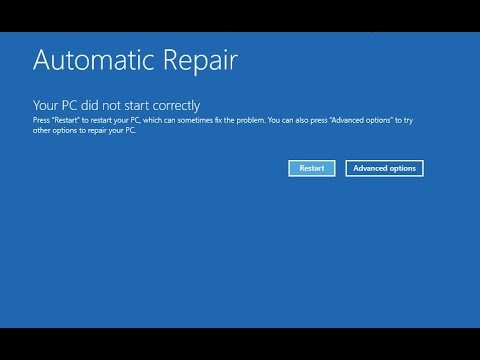

and After you can see the following screen.  Do following steps.


Next, Find the Startup Repair in Advanced Options. And Click Startup repair and 


 Next Click Restart.
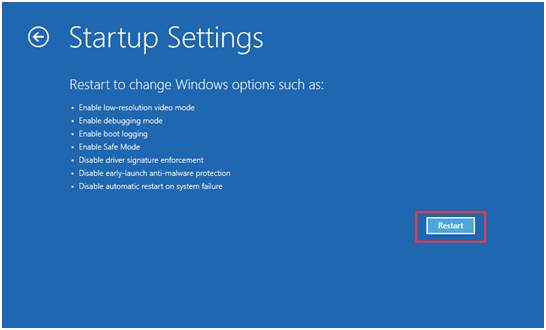

After Restarting now you can see the following screen and click number 4 or f8 to go to the safe mode.

Step 02) Now you can boot safe mode. When you in safe mode you can see "Update couldn't installed. Undoing changes" message. If after that msg windows goes to restart you must do step 01 to go safe mode again. After that, if needed you need to uninstall current on board all graphics drivers.

Step 03) After That Restart windows. 

Post by Gihan Sameera | Email: Sameera.ctv@gmail.com | Contact: +94755888115


This lesson Brought to you by 


Read More

How to get the Windows 10 April 2018 Update


Windows 10 version 1803
Windows 10 Spring Creators Update
Windows 10 April 2018 Update

What IS Windows 10 April 2018 Update(version 1803)?

Microsoft will launch the Windows 10 April 2018 Update soon, but as we’ve already told you, the rollout takes place in stages, an approach that allows the company to fix bugs before the new feature release becomes available for everyone.

In other words, Microsoft ships the April 2018 Update to a limited set of systems, then analyzes compatibility issues happening on these computers, fixes the bugs, and finally pushes the new tidbits to more devices. This means that eventually, all users should benefit from smoother upgrade performance and a substantially reduced number of problems after installing the new OS version.


Windows 10 April 2018 Update Features


Start menu


In this new update, the Start menu includes Reveal highlight, which is an interactive visualization that brings illumination to display hidden borders, help you navigate, and interact with an app. You’ll see this feature while hovering items in the “All apps” list and Live Tiles.

Additionally, right-clicking a Microsoft Store app, and selecting More, you’ll now see a Settings option that will take you straight to the settings page for that particular app.

Time Line

Timeline is an expansion of Task View, and it’s a feature that allows you to find and resume activities you were working in the past. It could be from a previous activity you were working on your Windows 10 device, or another PC, Android, or iOS device connected to your Microsoft account. 

Nearby Sharing

you’ll also find a new feature called Nearby Sharing that allows you to share any type of files and web links with minimal efforts wirelessly to nearby devices using Bluetooth or Wi-Fi connectivity 

and More.....


HOW TO UPGRADE?


(STEP 01)

UPDATE YOUR INTEL GRAPHIC DRIVER

You can Find Latest Driver From HERE OR Here

(STEP 02)

INSTALL THAT DOWNLOADED DRIVER AND RESTART PC.

(STEP 03)

SEARCH UPDATE FROM SETTINGS --> UPDATE & SEQURITY

Now you can see Feature Update 1803 (Data charges may apply)


Thanks. Stay With Us!

*All Names and brands and Some Contents are own for there Respective Owners. 
Read More

Intel Graphics Driver 24.20.100.6025 (Latest) Date: 4/26/2018


*PLEASE READ CAREFULLY

#Intel® Graphics Driver for Windows® 10
#Microsoft® Windows 10 April Update Launch Driver

This new driver brings significant quality and power saving improvements while displaying Enhanced Dynamic Range (EDR) content and provides better brightness in High Dynamic Range (HDR) mode for 7th Generation processors or higher. For a full list of Microsoft Windows® 10 April update features, please see here. 

SUPPORTED PRODUCTS

 8th Generation Intel® Core processors with Intel® UHD Graphics 610, 620, 630. 

 7th Generation Intel® Core processors, related Pentium®/ Celeron® Processors, and Intel® Xeon processors, with Intel® Iris® Plus Graphics 640, 650 and Intel® HD Graphics 610, 615, 620, 630, P630. 

 6 th Generation Intel® Core processors, Intel Core™ M, and related Pentium® processors, with Intel® Iris® Graphics 540, Intel® Iris® Graphics 550, Intel® Iris® Pro Graphics 580, and Intel® HD Graphics 510, 515, 520, 530. 

 Intel® Xeon® processor E3-1500M v5 family with Intel® HD Graphics P530 

 Pentium®/ Celeron® Processors with Intel® HD Graphics 500, 505 

NEW FEATURES:
1. Microsoft Windows® 10 April update features
2. Support for Direct X* 12 shader model 6.2
3. Supports the new task manager which displays GPU frequency and power status
4. Vulkan® 1.1 Support

Microsoft Windows "Setup.exe" Installation: 

- Save and unfasten the downloadable file. 

- Locate the hard drive index where the driver documents are put away utilizing the program or the Explore highlight of Windows. 

- From this index, double tap the "Setup.exe" document. 

- The primary exchange of the establishment UI will show up. Of course, a checkbox is chosen to naturally run WinSAT and empower the Windows Aero work area topic (if bolstered). Deselect the checkbox if this help ought to be killed. 

- Click "Next" to proceed. 

- Read the License Agreement and, in the event that you concur with the terms, click "Yes" to continue. 

- Review the Readme File data and snap "Next" to continue. 

- When the "Setup Progress" is finished, click "Next" to continue. 

- When the "Setup is Complete" screen shows up, click "Complete" to finish the establishment. 

Microsoft Windows "Have Disk" Installation 

- Click "Begin", right-click "PC", and snap "Properties". 

- Click "Gadget Manager" on the left. 

- In the "Client Account Control" window, click "Yes". 

- Double-click "Video Controller (VGA Compatible)" if exhibit under "Different Devices". (Go to stage 6). 

- Expand "Show connectors" and double tap the illustrations controller. 

- In the "Driver" tab, click "Refresh Driver". 

- Click "Peruse my PC for driver programming". 

- Click "Let me pick from a rundown of gadget drivers on my PC". 

- Click "Have Disk..." and snap "Peruse". 

- Browse to the index where you unfastened the document you downloaded, tap the "Designs" organizer, and select the "igdlh.INF" record. Snap "Open". 

- Click "alright" and click "Next". The working framework will introduce the driver. 

- Click "Close" and snap "Yes" to reboot. The driver should now be stacked. 

Windows Manual Installation

- Click "Begin", right-click "PC", and snap "Properties". 

- Click "Gadget Manager" on the left. 

- In the "Client Account Control" window, click "Yes". 

- Double-click "Video Controller (VGA Compatible)" if exhibit under "Different Devices". (Go to stage 6) 

- Expand "Show connectors" and double tap the illustrations controller. 

- In the "Driver" tab, click "Refresh Driver". 

- Click "Peruse my PC for driver programming". 

- Click straightforwardly "Peruse". 

- Browse to the registry where you unfastened the document you downloaded and tap the "Illustrations" envelope. 

- Click "alright" and click "Next". The working framework will introduce the driver on the off chance that it thinks about this an overhaul. 

- Click "Close" and snap "Yes" to reboot. The driver should now be stacked. 

Microsoft Windows Manual Installation - Display Audio 

- Click "Begin", right-click "PC", and snap "Properties". 

- Click "Gadget Manager" on the left. 

- In the "Client Account Control" window, click "Yes". 

- Double-click "Sound, video and amusement controllers". 

- If introducing without any preparation, right-tap the "Top notch Audio" controller. In the case of refreshing the driver, right-tap the "Intel Display Audio" controller. Snap "Refresh Driver Software...". 

- Click "Peruse my PC for driver programming". 

- Click "Let me pick from a rundown of gadget drivers on my PC". 

- Click "Have Disk..." and snap "Peruse". 

- Browse to the index where you unfastened the record you downloaded, tap the "DisplayAudio" organizer, and select the "IntcDAud.inf" document. Snap "Open" and snap "alright". 

- Select "Intel Display Audio" and snap "Next". 

- The working framework will introduce the driver. Snap "Complete" to finish the establishment. 

- Click "Yes" to reboot. The driver should now be stacked. 

- To decide whether the driver has been stacked accurately, allude to the Verifying Installation of the Software segment beneath.

KEY ISSUES FIXED:

  • Graphics anomalies may be observed in Warhammer: Vermintide 2* Main Menu*, NieR: Automata*, Atomega*, FinalFantasy XV*, and Split/Second*
  • PowerDVD* may issue “error code: 0107” which stops the media playback while resuming back from sleep


Read More

Microsoft & Apple is No Longer Enemy


Apple has authoritatively propelled iTunes for Windows 10, after Microsoft beforehand declared it back finally year's Build designer meeting. 

iTunes was initially anticipated to arrive in the Microsoft Store before the finish of 2017, however Apple required more opportunity to finish improvement in spite of confirmation implying at an up and coming dispatch. 

Similarly of course, the Microsoft Store adaptation of iTunes is indistinguishable to the work area kin and accompanies similar highlights and UI, so clients won't feel any distinction when propelling it. 

iTunes is Apple's first application for Windows 10 and it'll be fascinating to check whether the organization conveys refreshes at an indistinguishable pace from for the work area form. A few other vast organizations joined the Windows 10 application push however in the end relinquished their applications because of the stage not creating enough energy among clients and designers alike.


Read More

Intel HD Graphics 6th, 7th, 8th Gen Latest 23.20.16.4982


  • Intel® HD Graphics 520
  • Intel® Core™ i3-6006U Processor (3M Cache, 2.00 GHz)
  • Intel® Core™ i3-6098P Processor (3M Cache, 3.60 GHz)
  • Intel® Core™ i3-6100 Processor (3M Cache, 3.70 GHz)
  • Intel® Core™ i3-6100E Processor (3M Cache, 2.70 GHz)
  • Intel® Core™ i3-6100H Processor (3M Cache, 2.70 GHz)
  • Intel® Core™ i3-6100T Processor (3M Cache, 3.20 GHz)
  • Intel® Core™ i3-6100TE Processor (4M Cache, 2.70 GHz)
  • Intel® Core™ i3-6100U Processor (3M Cache, 2.30 GHz)
  • Intel® Core™ i3-6102E Processor (3M Cache, 1.90 GHz)
  • Intel® Core™ i3-6157U Processor (3M Cache, 2.40 GHz)
  • Intel® Core™ i3-6167U Processor (3M Cache, 2.70 GHz)
  • Intel® Core™ i3-6300 Processor (4M Cache, 3.80 GHz)
  • Intel® Core™ i3-6300T Processor (4M Cache, 3.30 GHz)
  • Intel® Core™ i3-6320 Processor (4M Cache, 3.90 GHz)
  • Intel® Core™ i3-7100 Processor (3M Cache, 3.90 GHz)
  • Intel® Core™ i3-7100E Processor (3M Cache, 2.90 GHz)
  • Intel® Core™ i3-7100H Processor (3M Cache, 3.00 GHz)
  • Intel® Core™ i3-7100T Processor (3M Cache, 3.40 GHz)
  • Intel® Core™ i3-7100U Processor (3M Cache, 2.40 GHz)
  • Intel® Core™ i3-7101E Processor (3M Cache, 3.90 GHz)
  • Intel® Core™ i3-7101TE Processor (3M Cache, 3.40 GHz)
  • Intel® Core™ i3-7102E Processor (3M Cache, 2.10 GHz)
  • Intel® Core™ i3-7130U Processor (3M Cache, 2.70 GHz)
  • Intel® Core™ i3-7167U Processor (3M Cache, 2.80 GHz)
  • Intel® Core™ i3-7300 Processor (4M Cache, 4.00 GHz)
  • Intel® Core™ i3-7300T Processor (4M Cache, 3.50 GHz)
  • Intel® Core™ i3-7320 Processor (4M Cache, 4.10 GHz)
  • Intel® Core™ i3-7350K Processor (4M Cache, 4.20 GHz)
  • Intel® Core™ i3-8100 Processor (6M Cache, 3.60 GHz)
  • Intel® Core™ i3-8130U Processor (4M Cache, up to 3.40 GHz)
  • Intel® Core™ i3-8350K Processor (8M Cache, 4.00 GHz)
  • Intel® Core™ i5-6198DU Processor (3M Cache, up to 2.80 GHz)
  • Intel® Core™ i5-6200U Processor (3M Cache, up to 2.80 GHz)
  • Intel® Core™ i5-6260U Processor (4M Cache, up to 2.90 GHz)
  • Intel® Core™ i5-6267U Processor (4M Cache, up to 3.30 GHz)
  • Intel® Core™ i5-6287U Processor (4M Cache, up to 3.50 GHz)
  • Intel® Core™ i5-6300HQ Processor (6M Cache, up to 3.20 GHz)
  • Intel® Core™ i5-6300U Processor (3M Cache, up to 3.00 GHz)
  • Intel® Core™ i5-6350HQ Processor (6M Cache, up to 3.20 GHz)
  • Intel® Core™ i5-6360U Processor (4M Cache, up to 3.10 GHz)
  • Intel® Core™ i5-6400 Processor (6M Cache, up to 3.30 GHz)
  • Intel® Core™ i5-6400T Processor (6M Cache, up to 2.80 GHz)
  • Intel® Core™ i5-6402P Processor (6M Cache, up to 3.40 GHz)
  • Intel® Core™ i5-6440EQ Processor (6M Cache, up to 3.40 GHz)
  • Intel® Core™ i5-6440HQ Processor (6M Cache, up to 3.50 GHz)
  • Intel® Core™ i5-6442EQ Processor (6M Cache, up to 2.70 GHz)
  • Intel® Core™ i5-6500 Processor (6M Cache, up to 3.60 GHz)
  • Intel® Core™ i5-6500T Processor (6M Cache, up to 3.10 GHz)
  • Intel® Core™ i5-6500TE Processor (6M Cache, up to 3.30 GHz)
  • Intel® Core™ i5-6585R Processor (6M Cache, up to 3.60 GHz)
  • Intel® Core™ i5-6600 Processor (6M Cache, up to 3.90 GHz)
  • Intel® Core™ i5-6600K Processor (6M Cache, up to 3.90 GHz)
  • Intel® Core™ i5-6600T Processor (6M Cache, up to 3.50 GHz)
  • Intel® Core™ i5-6685R Processor (6M Cache, up to 3.80 GHz)
  • Intel® Core™ i5-7200U Processor (3M Cache, up to 3.10 GHz)
  • Intel® Core™ i5-7260U Processor (4M Cache, up to 3.40 GHz)
  • Intel® Core™ i5-7267U Processor (4M Cache, up to 3.50 GHz)
  • Intel® Core™ i5-7287U Processor (4M Cache, up to 3.70 GHz)
  • Intel® Core™ i5-7300HQ Processor (6M Cache, up to 3.50 GHz)
  • Intel® Core™ i5-7300U Processor (3M Cache, up to 3.50 GHz)
  • Intel® Core™ i5-7360U Processor (4M Cache, up to 3.60 GHz)
  • Intel® Core™ i5-7400 Processor (6M Cache, up to 3.50 GHz)
  • Intel® Core™ i5-7400T Processor (6M Cache, up to 3.00 GHz)
  • Intel® Core™ i5-7440EQ Processor (6M Cache, up to 3.60 GHz)
  • Intel® Core™ i5-7440HQ Processor (6M Cache, up to 3.80 GHz)
  • Intel® Core™ i5-7442EQ Processor (6M Cache, up to 2.90 GHz)
  • Intel® Core™ i5-7500 Processor (6M Cache, up to 3.80 GHz)
  • Intel® Core™ i5-7500T Processor (6M Cache, up to 3.30 GHz)
  • Intel® Core™ i5-7600 Processor (6M Cache, up to 4.10 GHz)
  • Intel® Core™ i5-7600K Processor (6M Cache, up to 4.20 GHz)
  • Intel® Core™ i5-7600T Processor (6M Cache, up to 3.70 GHz)
  • Intel® Core™ i5-7Y54 Processor (4M Cache, up to 3.20 GHz)
  • Intel® Core™ i5-7Y57 Processor (4M Cache, up to 3.30 GHz)
  • Intel® Core™ i5-8250U Processor (6M Cache, up to 3.40 GHz)
  • Intel® Core™ i5-8350U Processor (6M Cache, up to 3.60 GHz)
  • Intel® Core™ i5-8400 Processor (9M Cache, up to 4.00 GHz)
  • Intel® Core™ i5-8600K Processor (9M Cache, up to 4.30 GHz)
  • Intel® Core™ i7-6498DU Processor (4M Cache, up to 3.10 GHz)
  • Intel® Core™ i7-6500U Processor (4M Cache, up to 3.10 GHz)
  • Intel® Core™ i7-6560U Processor (4M Cache, up to 3.20 GHz)
  • Intel® Core™ i7-6567U Processor (4M Cache, up to 3.60 GHz)
  • Intel® Core™ i7-6600U Processor (4M Cache, up to 3.40 GHz)
  • Intel® Core™ i7-6650U Processor (4M Cache, up to 3.40 GHz)
  • Intel® Core™ i7-6660U Processor (4M Cache, up to 3.40 GHz)
  • Intel® Core™ i7-6700 Processor (8M Cache, up to 4.00 GHz)
  • Intel® Core™ i7-6700HQ Processor (6M Cache, up to 3.50 GHz)
  • Intel® Core™ i7-6700K Processor (8M Cache, up to 4.20 GHz)
  • Intel® Core™ i7-6700T Processor (8M Cache, up to 3.60 GHz)
  • Intel® Core™ i7-6700TE Processor (8M Cache, up to 3.40 GHz)
  • Intel® Core™ i7-6770HQ Processor (6M Cache, up to 3.50 GHz)
  • Intel® Core™ i7-6785R Processor (8M Cache, up to 3.90 GHz)
  • Intel® Core™ i7-6820EQ Processor (8M Cache, up to 3.50 GHz)
  • Intel® Core™ i7-6820HK Processor (8M Cache, up to 3.60 GHz)
  • Intel® Core™ i7-6820HQ Processor (8M Cache, up to 3.60 GHz)
  • Intel® Core™ i7-6822EQ Processor (8M Cache, up to 2.80 GHz)
  • Intel® Core™ i7-6870HQ Processor (8M Cache, up to 3.60 GHz)
  • Intel® Core™ i7-6920HQ Processor (8M Cache, up to 3.80 GHz)
  • Intel® Core™ i7-6970HQ Processor (8M Cache, up to 3.70 GHz)
  • Intel® Core™ i7-7500U Processor (4M Cache, up to 3.50 GHz )
  • Intel® Core™ i7-7560U Processor (4M Cache, up to 3.80 GHz)
  • Intel® Core™ i7-7567U Processor (4M Cache, up to 4.00 GHz)
  • Intel® Core™ i7-7600U Processor (4M Cache, up to 3.90 GHz)
  • Intel® Core™ i7-7660U Processor (4M Cache, up to 4.00 GHz)
  • Intel® Core™ i7-7700 Processor (8M Cache, up to 4.20 GHz)
  • Intel® Core™ i7-7700HQ Processor (6M Cache, up to 3.80 GHz)
  • Intel® Core™ i7-7700K Processor (8M Cache, up to 4.50 GHz)
  • Intel® Core™ i7-7700T Processor (8M Cache, up to 3.80 GHz)
  • Intel® Core™ i7-7820EQ Processor (8M Cache, up to 3.70 GHz)
  • Intel® Core™ i7-7820HK Processor (8M Cache, up to 3.90 GHz)
  • Intel® Core™ i7-7820HQ Processor (8M Cache, up to 3.90 GHz)
  • Intel® Core™ i7-7920HQ Processor (8M Cache, up to 4.10 GHz)
  • Intel® Core™ i7-7Y75 Processor (4M Cache, up to 3.60 GHz)
  • Intel® Core™ m3-6Y30 Processor (4M Cache, up to 2.20 GHz)
  • Intel® Core™ m3-7Y30 Processor (4M Cache, 2.60 GHz )
  • Intel® Core™ m3-7Y32 Processor (4M Cache, up to 3.00 GHz)
  • Intel® Core™ m5-6Y54 Processor (4M Cache, up to 2.70 GHz)
  • Intel® Core™ m5-6Y57 Processor (4M Cache, up to 2.80 GHz)
  • Intel® Core™ m7-6Y75 Processor (4M Cache, up to 3.10 GHz)
  • Intel® HD Graphics 500
  • Intel® HD Graphics 505
  • Intel® HD Graphics 510
  • Intel® HD Graphics 515
  • Intel® HD Graphics 530
  • Intel® HD Graphics 610
  • Intel® HD Graphics 615
  • Intel® HD Graphics 620
  • Intel® HD Graphics 630
  • Intel® HD Graphics for 6th Generation Intel® Processors
  • Intel® HD Graphics P530
  • Intel® HD Graphics P630
  • Intel® Iris™ Graphics 540
  • Intel® Iris™ Graphics 550
  • Intel® Iris™ Plus Graphics 640
  • Intel® Iris™ Plus Graphics 650
  • Intel® Iris™ Pro Graphics 580
  • Intel® Iris™ Pro Graphics P580
  • Intel® UHD Graphics 600
  • Intel® UHD Graphics 605
  • Intel® UHD Graphics 620
  • Intel® UHD Graphics 630


Windows 10 64

Or 


*All names And Brand Property of Intel
Read More